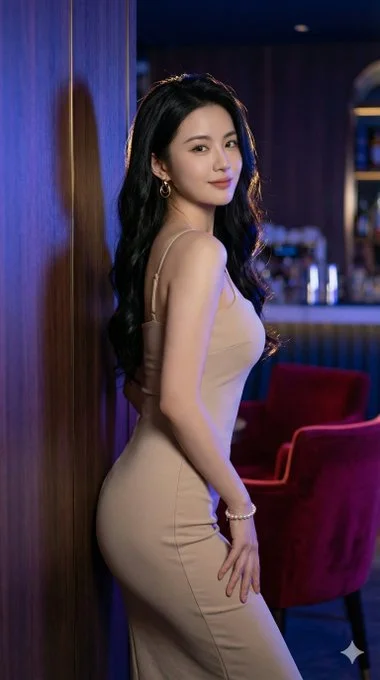
AI portrait photography, isn’t this the super S-curve figure you guys love? So damn captivating! Want to try making one for your ex-girlfriend too?

Nano Banana Prompt
{
  "prompt_configuration": {
    "version": "1.0",
    "target_aspect_ratio": "9:16",
    "output_format": "photorealistic_8k"
  },
  "subject": {
    "description": "Stunning woman with sharp, attractive facial features and a confident, mysterious smile",
    "gaze": "Looking over shoulder toward the camera with allure",
    "hair": {
      "length": "Very long",
      "style": "Voluminous, wavy",
      "color": "Black",
      "placement": "Cascading down her back"
    },
    "physique": {
      "type": "Curvy and elegant figure",
      "traits": [
        "Feminine silhouette",
        "Slender waist",
        "Graceful posture"
      ]
    },
    "pose": {
      "position": "Side profile, leaning elegantly against a wooden wall",
      "interaction": "Shoulder lightly touching the wall",
      "hand_placement": "One hand resting naturally on hip"
    }
  },
  "attire": {
    "dress": {
      "type": "Bodycon midi dress",
      "color": "Beige",
      "fit": "Form-fitting, highlighting the silhouette",
      "features": [
        "Sleeveless",
        "Thin spaghetti straps"
      ]
    },
    "accessories": [
      "Elegant gold hoop earrings",
      "Pearl bracelet"
    ]
  },
  "environment": {
    "setting": "Luxury lounge/bar interior at night",
    "background_elements": [
      "Wooden wall (foreground texture)",
      "Deep red velvet chairs in soft focus"
    ],
    "lighting": {
      "type": "Cinematic neon ambient lighting",
      "colors": [
        "Blue",
        "Purple",
        "Gold rim light"
      ]
    }
  },
  "technical_specifications": {
    "camera_gear": "Canon EOS R5",
    "photography_style": "Professional fashion photography",
    "color_grading": "Cinematic and moody",
    "quality_tags": [
      "Photorealistic",
      "8k resolution",
      "Ultra-detailed textures",
      "Sharp focus",
      "Masterpiece"Use the face without any change.
    ]
  }
}