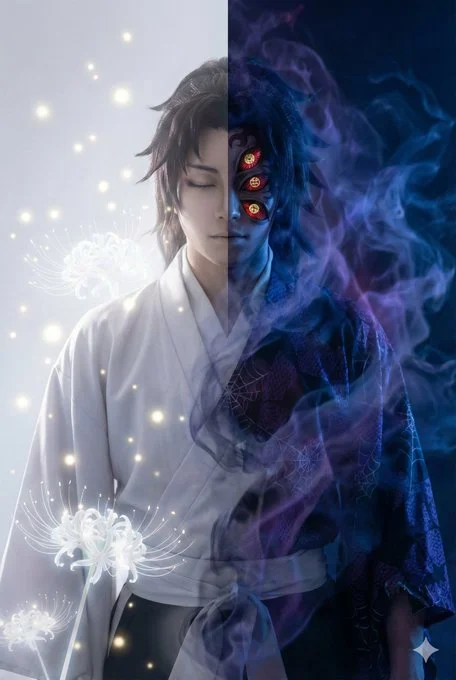
Double-exposure Portrait featuring Split Composition - Ethereal
Unknown1:1

Double-exposure Portrait featuring Split Composition - Ethereal

Double-exposure Portrait featuring Split Composition - Ethereal, shaped around portrait and double-exposure art direction.

#portrait#double-exposure#glitch-art#surrealism#ethereal

Best used for

Use for character exploration, portrait studies, costume variations, or visual-development boards.

Created by

Prompt Bookmarks @promptbookmarks Original source: x.com

The prompt

Copy it.
Then make it yours.

 技术贴:AI 构图的“撕裂感”怎么做?

很多时候我们想表现角色的黑化,但单独画一张黑化图又觉得没意思。  
试着把“光”与“暗”塞进同一个轮廓里。

 关键指令解析:

Split Composition:强制 AI 进行左右分屏构图。  
State A vs State B:在同一个 Prompt 里明确定义两套对立的视觉元素(如:白光 vs 蓝火,闭眼 vs 红眼)。  
Translucent Layering:这是让两张脸不“打架”而是“融合”的魔法词。

 适用场景  
- 表现角色的黑化/觉醒前后  
- 日夜交替、善恶共存的主题  
- 需要富有哲理或深度的概念海报

关键 Prompt 模板在下方  欢迎返图!

**Style**: Artistic double exposure portrait showcasing inner duality.  
**Composition**: Split composition blending two states of [Role] seamlessly.  
**Left Side**: [State A: e.g., Serene, Angelic, White Light, Closed Eyes], representing the pure facade.  
**Right Side**: [State B: e.g., Corrupted, Demonic, Blue Shadows, Glowing Red Eyes], representing the hidden truth.  
**Blending**: The two forms merge at the centerline through translucent layering and smoke effects. Silhouette boundaries are dissolved.  
**Keywords**: double exposure, split personality, inner conflict, surrealism, ethereal blending.

Detected placeholders

[Role][State A: e.g., Serene, Angelic, White Light, Closed Eyes]
Refinement notes

Three useful ways to customize it

01

Subject and action

Replace the central subject first, then adjust its pose, action, expression, or relationship to the scene.

02

Composition and light

Change the viewpoint, crop, negative space, light direction, and contrast before layering on more style words.

03

Output shape

The saved reference uses 1:1. Change the aspect ratio to match the final placement before refining small details.