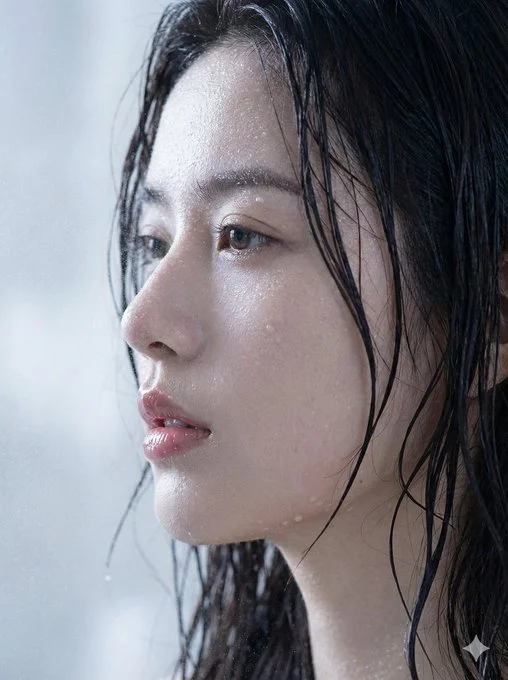
真实感才是最美的
Realism is the most beautiful.

Nano Banana Prompt

{
  "request_metadata": {
    "version": "2.0",
    "priority_focus": "Hyper-realistic skin textures and identity fidelity",
    "aspect_ratio": "3:4"
  },
  "subject_configuration": {
    "identity": {
      "name": "the person I uploaded",
      "reference_mode": "strict_identity_matching",
      "source_reference": "uploaded_files",
      "preservation_weight": 1.0,
      "angle": "Extreme profile view"
    },
    "facial_attributes": {
      "eyes": {
        "reflection_type": "Realistic catchlights",
        "aesthetic_constraint": "Avoid synthetic gloss or excessive shine"
      },
      "lips": {
        "state": "Parted / Moist",
        "surface_texture": "Soft natural ridges",
        "finish": "Glossy sheen without distortion"
      },
      "hair": {
        "color": "Dark Brunette",
        "state": "Saturated / Wet",
        "styling": "Clumping in natural strands, adhered to temples and neck"
      }
    }
  },
  "environmental_rendering": {
    "moisture_fx": {
      "sweat_layer": "Fine glistening mist across the bridge of nose and forehead",
      "water_droplets": "Micro-droplets scattered on cheekbones and jawline",
      "surface_tension": "Realistic liquid adhesion to skin"
    },
    "lighting_and_color": {
      "lighting_style": "Soft-box diffusion",
      "temperature": "Cool tones",
      "color_palette": ["Steel Blue", "Soft Cyan", "Natural Skin Tones"],
      "background": {
        "description": "Minimalist bokeh",
        "colors": ["Light Grey", "Pure White"],
        "depth_of_field": "Shallow"
      }
    }
  },
  "technical_execution": {
    "rendering_engine": "CGI Photorealistic",
    "focal_length": "85mm macro",
    "texture_detail": "Pore-level resolution",
    "post_processing": "Raw photography style, no airbrushing"
  }
}
Detected placeholders
["Steel Blue", "Soft Cyan", "Natural Skin Tones"]["Light Grey", "Pure White"]