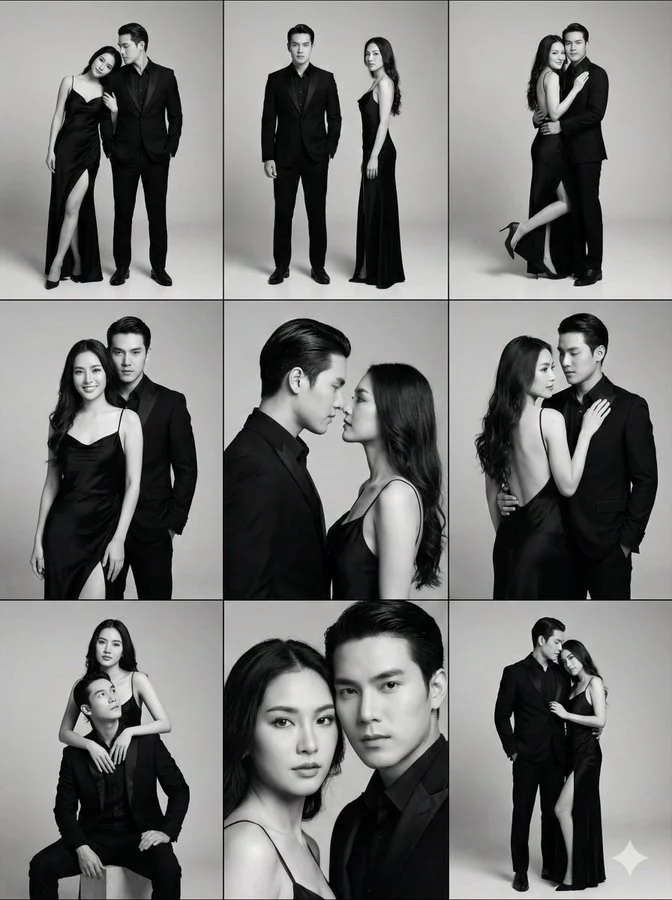
Get a Professional Photoshoot with your Partner

Prompt:

{
  "image_generation_prompt": {
    "structure": {
      "type": "3x3 Photo Grid (9-Panel Collage).",
      "layout": "Three rows, three columns. Vertical portrait orientation for each panel.",
      "theme": "High-end Couple's Fashion Editorial / Pre-wedding Photoshoot.",
      "color_palette": "Black and White (Monochromatic), Greyscale.",
      "consistency": "Same couple, same outfits, changing poses."
    },
    "subject_details": {
      "couple_demographics": "Attractive young Asian couple.",
      "male_subject": {
        "outfit": "All-black tailored tuxedo suit, black dress shirt, no tie (open collar) or black tie.",
        "hair": "Slicked back, styled.",
        "vibe": "Stoic, protective, masculine."
      },
      "female_subject": {
        "outfit": "Long black silk evening gown with thin spaghetti straps, low back, and a high thigh slit.",
        "hair": "Long, dark, loose waves.",
        "vibe": "Elegant, seductive, graceful."
      }
    },
    "environment": {
      "setting": "Minimalist Photo Studio.",
      "background": "Seamless solid grey backdrop (Cyclorama).",
      "props": "None (Focus entirely on the subjects)."
    },
    "pose_variations_breakdown": {
      "row_1_full_body": [
        "Couple standing side-by-side; woman leaning against man's shoulder, one leg extended through the dress slit.",
        "Standing apart; man looking at camera, woman standing in profile showing off the dress silhouette.",
        "Man embracing woman from behind; woman leaning back into him, leg hooked around his leg."
      ],
      "row_2_medium_shots": [
        "Woman facing forward, man standing closely behind her looking over her shoulder.",
        "Intimate profile view; faces very close, noses almost touching, romantic tension.",
        "Woman turned away from camera showing bare back, looking over shoulder at man."
      ],
      "row_3_close_ups_and_seated": [
        "Man seated on floor or box, woman standing behind him with arms draped over his shoulders.",
        "Tight close-up of faces cheek-to-cheek, serious model expressions.",
        "Couple standing, woman leaning head on man's chest, man looking down protectively."
      ]
    },
    "camera_technical_values": {
      "style": "Fashion Editorial / Studio Portraiture.",
      "lens": "85mm (Portrait telephoto for flattering compression).",
      "aperture": "f/8.0 (Deep depth of field to keep both subjects in focus).",
      "shutter_speed": "1/160s.",
      "iso": "ISO 100.",
      "lighting_setup": "Soft Studio Lighting. Large softbox or umbrella to create soft gradients on the black fabric and skin. 'Rembrandt' or 'Butterfly' lighting patterns depending on the angle.",
      "post_processing": "High contrast black and white conversion, clean shadows."
    }