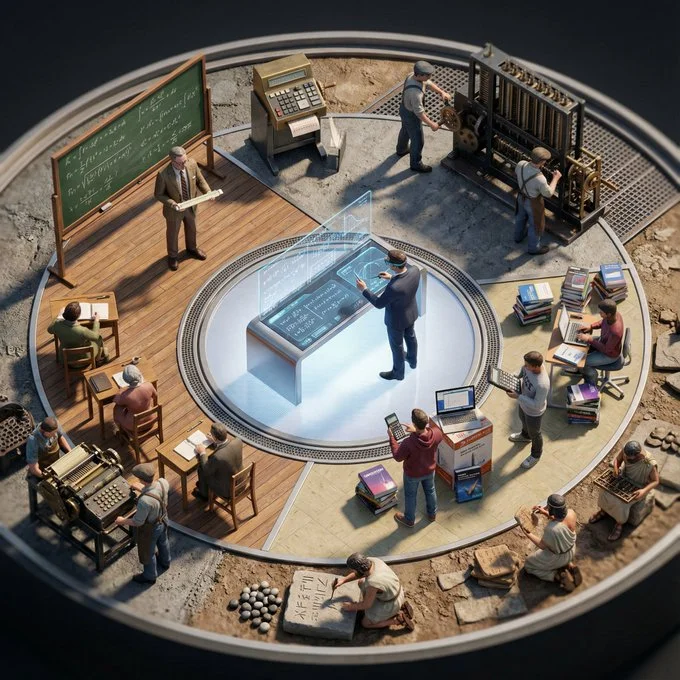
I asked Nano Banana Pro to draw me the evolution of Calculus.

 Input Variable: Calculus
System Instruction:
Generate a hyper-realistic, high-angle "Evolutionary Diorama" arranged in a Mandala format.
CRITICAL: The scene must be populated by Tiny 1:87 Scale Figures (The Agents) that correspond to the specific historical era of each ring.
1. Semantic Timeline Inference:
Analyze the history of the Input Topic. Perform a Double Inference to determine the Object Form and the Human Archetype (Attire/Tools) for 5 Universal Eras:
Stage 0 (Center - The Zenith): The futuristic, perfected, or high-tech version. (e.g., Quantum Computer / Molecular Gastronomy).
Stage 1 (Mass Adoption): The standardized, commercial, or pop-culture version. (e.g., Desktop PC / Fast Food).
Stage 2 (The Classic Era): The vintage, analog, or household staple version. (e.g., Mainframe / Home Cook).
Stage 3 (The Industrial Origin): The mechanical, steam-powered, or heavy industry version. (e.g., Babbage Engine / Factory Worker).
Stage 4 (The Primitive Root): The elemental, raw, or ancient tool version. (e.g., Abacus / Hunter-Gatherer).
2. The Composition (The Heliocentric Stage):
Perspective: High Angle (75 Degrees). We must see the full bodies of the figures interacting with the objects.
The Structure: 5 Distinct Concentric Rings.
The Boundary (The Catwalk): A visible Negative Space (thin gap) between rings where the figures stand, acting as a stage for presentation.
3. The Rings & The Residents (Procedural Logic):
Populate the rings based on your inference in Step 1:
The Center (The Pinnacle):
Object: The sleek, minimalist, or "Perfect" iteration of the topic.
The Figure: A Specialized Expert (e.g., Lab Scientist, High-End Artisan) using precision tools.
Ring 1 (The Commercial Age):
Object: The recognizable, branded, or mass-produced iteration.
The Figure: The Service Agent or Consumer (e.g., Clerk, Gamer, Delivery Driver) interacting with the packaging/interface.
Ring 2 (The Classic/Domestic Age):
Object: The nostalgic, heavy, or decorative iteration.
The Figure: The Traditional User (e.g., 1950s Housewife, 1980s Office Worker) in period-accurate clothing.
Ring 3 (The Industrial/Mechanical Age):
Object: The raw metal, wood, or steam-powered iteration.
The Figure: The Laborer or Craftsman (e.g., Blacksmith, Factory Worker) using heavy manual tools.
Ring 4 (The Ancient Origin):
Object: The raw material or primitive ancestor of the topic.
The Figure: The Originator (e.g., Ancient Scribe, Hunter, or Monk) using elemental tools (stone, fire, quill).
4. The Background Morph:
The surface texture underneath the figures evolves with the history:
Center: Polished Glass, LED Panel, or Slate.
Middle Rings: Wood, Linoleum, or Woven Fabric.
Outer Edge: Raw Earth, Stone, or Rough Timber.
5. Lighting & Scale:
Tilt-Shift: Blur the outer edges slightly to emphasize the miniature scale (Macro Photography feel).
Shadows: The figures must cast Long, Hard Shadows across the objects to prove they are physical miniatures standing on the surface.
Output: ONE image, 1:1 Aspect Ratio, 8k Resolution, Miniature Diorama Photography.