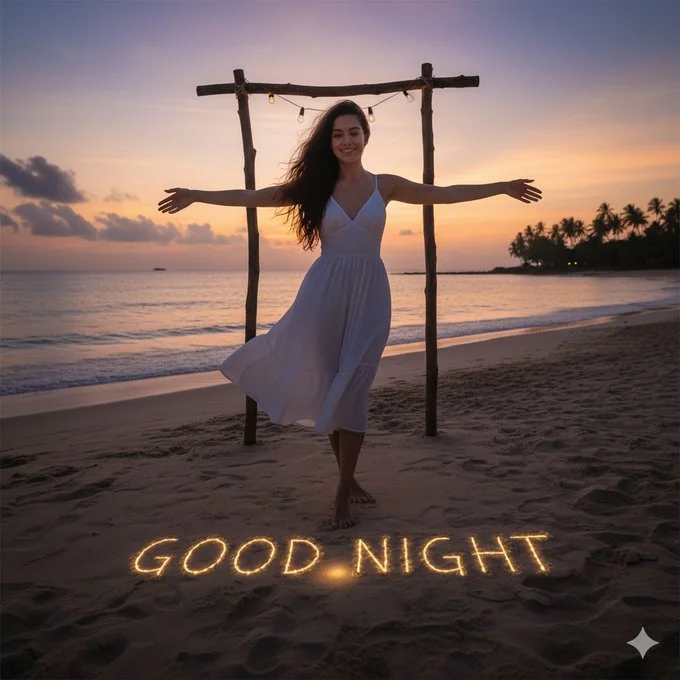
Nano banana Prompt 3.0
{
  "prompt": {
    "scene": "A serene tropical beach at sunset with soft pastel skies transitioning from warm orange to purple hues.",
    "subject": {
      "description": "A young woman standing barefoot on the beach with her arms stretched wide, expressing peace and freedom.",
      "appearance": {
        "gender": "female",
        "hair": "Long, dark brown hair flowing naturally in the ocean breeze",
        "outfit": "Elegant white sleeveless summer dress, lightweight fabric gently moving with the wind",
        "expression": "Calm, joyful smile with relaxed posture"
      },
      "pose": "Standing centered beneath a rustic wooden frame, arms extended horizontally"
    },
    "environment": {
      "location": "Tropical beach shoreline",
      "background": "Calm ocean waves, distant palm trees silhouetted on the horizon",
      "props": [
        "Wooden arch made of natural logs",
        "Warm string lights hanging across the top beam"
      ],
      "text_on_sand": {
        "content": "GOOD NIGHT",
        "style": "Glowing golden light embedded in the sand",
        "font": "Soft handwritten-style lettering"
      }
    },
    "lighting": {
      "type": "Golden hour / dusk lighting",
      "mood": "Warm, peaceful, dreamy",
      "highlights": "Soft glow on subject and illuminated sand text"
    },
    "style": {
      "photography": "Cinematic, shallow depth of field",
      "quality": "Ultra-realistic, high resolution",
      "color_grading": "Warm tones with soft contrast"
    },
    "camera": {
      "angle": "Eye-level",
      "lens": "35mm",
      "focus": "Sharp focus on subject, softly blurred background"
    }
  }
}