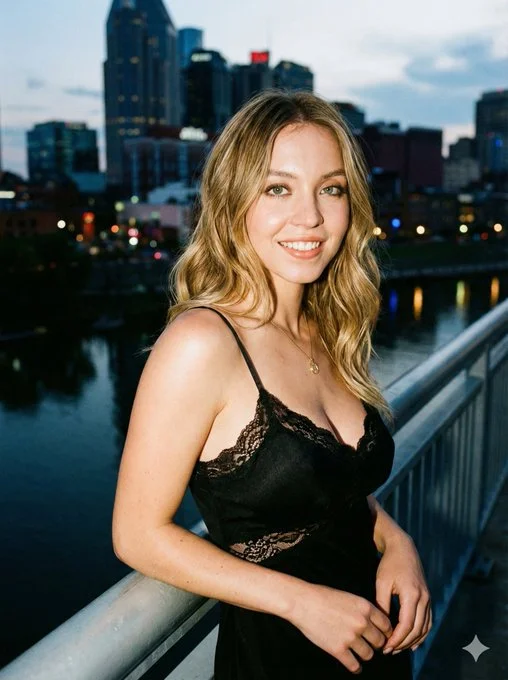
Sydney Sweeney × Ana de Armas.

Elegance that stops you mid-scroll.

Prompt:

{
  "prompt_configuration": {
    "type": "Ultra Photorealistic Portrait",
    "aspect_ratio": "3:4",
    "style_model": "Raw Photography"
  },
  "visual_elements": {
    "subject": {
      "description": "Name, young Hollywood actress, fair skin, slender fit physique, radiant natural beauty.",
      "hair": "Long, honey blonde hair with soft waves, slightly tousled, cascading over one shoulder naturally.",
      "face": "Striking features with expressive eyes, soft glossy lips, subtle smoky eye makeup, warm natural smile, eyes looking slightly toward camera for cinematic charm.",
      "skin_texture": "Hyper-realistic skin with visible pores, natural sheen from flash lighting, lifelike complexion."
    },
    "appire_and_styling": {
      "outfit": "Black form-fitting cocktail slip dress with lace detailing on bust cups, sweetheart neckline, delicate tie-string front, thin spaghetti straps.",
      "accessories": "Minimalist gold pendant necklace, small stud earrings.",
      "makeup": "Night-out glamour with dewy luminous finish, subtle highlighter on cheekbones and nose bridge."
    },
    "pose_and_action": {
      "stance": "Leaning slightly back on a silver railing of a nighttime city bridge, body angled in a 3/4 view toward camera for maximum elegance.",
      "body_language": "Hip subtly shifted to create a soft S-curve silhouette, relaxed shoulders, confident and feminine posture.",
      "arms": "Left forearm resting gracefully on railing, right hand lightly touching hair or waist to create natural flow.",
      "head_position": "Head slightly tilted, eyes sparkling, full warm smile directly or slightly angled toward camera for approachable cinematic look.",
      "legs": "One leg extended forward with slight knee bend, creating elegance and dynamic silhouette."
    },
    "environment": {
      "setting": "Nighttime urban waterfront or city bridge.",
      "background": "Dark night sky with cinematic bokeh of city lights, vertical yellow light strips, distant blurred signage, reflective water below railing.",
      "atmosphere": "Vibrant, moody city nightlife — intimate, glamorous, cinematic, spontaneous."
    }
  },
  "technical_details": {
    "lighting": {
      "type": "Direct on-camera flash or compact strobe",
      "effect": "High contrast highlighting face, shoulders, and collarbones; crisp shadows for paparazzi-style cinematic look."
    },
    "camera_gear": {
      "camera": "Sony A7R V or Canon EOS R5",
      "lens": "85mm f/1.4",
      "settings": "Aperture f/2.8, ISO 800, Shutter Speed 1/125s",
      "focus": "Pin-sharp focus on eyes and facial features with shallow depth of field."
    },
    "quality_tags": [
      "8K resolution",
      "hyper-realistic",
      "raw photo",
      "film grain",
      "paparazzi aesthetic",
      "cinematic realism",
      "unreal engine 5 render",
      "masterpiece",
      "highly detailed textures"
    ]
  }
}